Payment invoices
Bill them. They pay it online.
Raise an invoice in Taka against a customer you already hold, email it with the PDF attached, and let them settle it on the same hosted checkout everything else on Moneybag runs through.
What is on one
A document, not a payment request
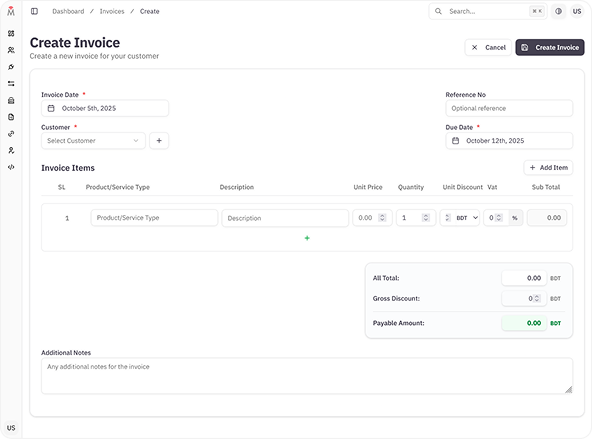
Quantities, discounts and VAT per line; one flat discount across the whole invoice; a payable figure Moneybag works out itself. Amounts are in Bangladeshi Taka.
On the invoice
- Invoice number
- Issued for you, unique, twenty characters.
- Your reference
- Optional — your own order or job number.
- Customer
- Chosen from your customer book.
- Invoice date
- When you raised it.
- Due date
- Also the day the payment page stops accepting it.
- Notes
- Free text at the foot of the document.
On every line
- Product or service
- What you are charging for.
- Description
- The detail underneath it.
- Unit price × quantity
- The line before anything is taken off.
- Discount
- A percentage, or a flat amount off each unit.
- VAT
- A percentage, applied after the discount.
- Line total
- What that row contributes.
How you make one
Four steps in the dashboard
- 01
Pick the customer
Search your customer book by name, phone or email. Add a new one first if they are not in it yet.
- 02
Add the lines
One row per product or service, each with its own quantity, discount and VAT. Moneybag recalculates every total on the server, so what the customer owes is not whatever the browser said.
- 03
Send it
One press emails the customer a payment page and attaches the invoice as a PDF. You can send it again if it is missed, up to five times.
- 04
They pay it
The page opens the ordinary Moneybag checkout, and the invoice marks itself paid the moment the payment is confirmed.
When it is paid
It marks itself, then tells you
An invoice is DUE or it is PAID, and it makes that change itself the moment the payment is confirmed against the acquirer — not when someone remembers to reconcile it.
- An email to your business address and to every user on the account — queued and delivered within about half a minute, not instantly.
- An alert in the portal, live, without a refresh.
- A signed webhook to your server, if you have set one up.
- Settlement on the cycle agreed in your merchant agreement, released by a person.
Paid on the same checkout
-
 Visa
Visa -
 Mastercard
 -
 American Express
 -
 UnionPay
 -
 Diners Club
 -
 DBBL Nexus
 -
 bKash
bKash -
 Nagad
Nagad -
 Rocket
 -
 upay
upay -
 tap
tap
When there are many
Two things you do not have to repeat
-
The same bill, on a schedule
Set a template running daily, weekly, monthly or yearly — or every second week — against one customer or a whole list. Moneybag raises each invoice when it falls due and can email it without you. Pause it, resume it, or run the next one early.
-
Hundreds at once
Upload a spreadsheet, check what Moneybag read back before anything is created, then submit. Customers it has not seen before are added as it goes, matched on phone number.
Moneybag does not chase an unpaid invoice for you. There is no automatic reminder — if one is missed, you send it again from the dashboard. Finding it is the easy part: filter by number, your own reference, customer, amount, status or date range, and take a PDF of one invoice or of the whole list.
Have Questions? Let's Talk!
Book your free 15-minute consultation with our payment experts.